


Encapsulation and abstraction are two fundamental concepts in C++ object-oriented programming (OOP). They help developers organise code, control access to data and manage the complexity of large software applications.
Although the concepts are closely related, they solve different problems. Encapsulation groups data and the functions that operate on it within a class, while abstraction hides implementation details and exposes only the functionality users need.
Both concepts remain relevant in 2026, including in software that uses AI APIs, cloud services and complex application architectures. Understanding them can help you write C++ code that is easier to maintain, test and extend.
Let’s look at how encapsulation and abstraction work in C++, their differences, practical examples and where developers use them.
What Is Encapsulation in C++?
Encapsulation in C++ is the process of combining data members and the functions that operate on them into a single unit, usually a class. It also allows developers to control how other parts of a program access that data.
For example, consider a bank account. It contains information such as an account balance and operations such as depositing or withdrawing money. A program should not allow any part of the application to change the balance to an invalid value directly.
Encapsulation helps manage this by keeping the balance private and providing public functions through which the account can be updated.
In C++, encapsulation is commonly implemented using classes and access specifiers.
How Does Encapsulation Work in C++?
Encapsulation in C++ works through access specifiers. A class usually declares its data members as private, so only its own member functions and friends can read or change them, and exposes selected operations as public functions. Every change to the object’s state then goes through code the class controls, which keeps the data valid.
C++ provides three main access specifiers that determine where class members can be accessed:
| Access specifier | Meaning |
| private | Members can be accessed only by the class’s member functions and its friends. |
| public | Members can be accessed from anywhere the object is accessible. |
| protected | Members can be accessed by the class, its friends and derived classes, subject to access rules. |
By declaring data members as private and exposing selected operations through public functions, developers can control how an object is used.
For example, a class can allow users to deposit money into an account without allowing them to change its balance directly.
Example of Encapsulation in C++
Consider a BankAccount class. Its balance is private, while its public functions allow users to check the balance and deposit money.
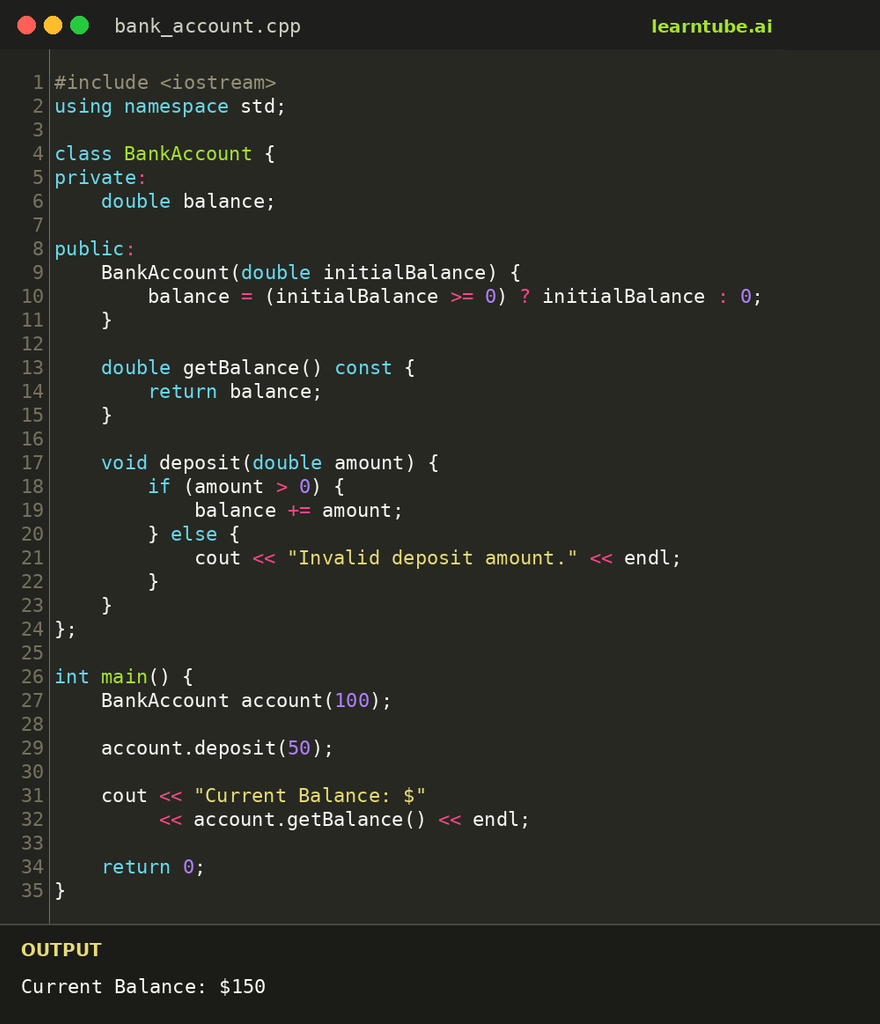
In this example:
- balance is declared as private, so it cannot be changed directly from outside the class.
- getBalance() provides a way to read the balance.
- deposit() allows the balance to increase only when the deposit amount is valid.
- The class controls how its internal data is updated.
This is encapsulation in practice. The class manages its own data and provides a defined way for other parts of the program to interact with it.
What Is the Difference Between Encapsulation and Data Hiding?
Encapsulation and data hiding are related, but they are not interchangeable terms.
Encapsulation means grouping data and the operations associated with it within a class. Data hiding refers to restricting access to internal data or implementation details.
For example, declaring a class variable as private is a way to hide that data from code outside the class.Encapsulation brings data and related functions together in a class, allowing developers to control access to the data.
What Are the Types of Encapsulation in C++?
C++ does not define formal language-level categories called types of encapsulation. However, you can understand the concept from a few practical perspectives:
- Data encapsulation: Developers keep data members within a class and control how other parts of the program access them.
- Function encapsulation: Grouping the operations that work on an object’s data within the same class.
- Class-level encapsulation: Bringing related data and behaviour together to represent a specific entity or responsibility.
Developers use these perspectives to understand how encapsulation works; C++ does not define them as official classifications.
What Is Abstraction in C++?
Abstraction in C++ means hiding unnecessary implementation details and exposing only the essential features of an object. In practice, a C++ class gives its users a small set of public functions or an abstract base class to work with, while the code that does the actual work stays hidden behind that interface.
Think about using an ATM. You can withdraw cash, check your balance or transfer money without knowing how the machine communicates with the bank’s servers or processes each transaction.
The ATM provides a simple interface while handling complex operations in the background.
In C++, abstraction allows developers to work with an object’s functionality without needing to understand all the code behind it.
How Is Abstraction Implemented in C++?
Developers implement abstraction in C++ using classes, access specifiers and abstract classes. Access specifiers hide a class’s internal members, header files and libraries hide how ready-made functions work, and abstract classes define a common set of functions that every derived class must implement.
One common approach is to create an abstract class with at least one pure virtual function. Developers declare a pure virtual function by assigning = 0 in its declaration. You cannot create an object of a class that has a pure virtual function unless a derived class implements all its inherited pure virtual functions.
C++ does not have a separate interface keyword. Instead, developers often use abstract base classes to define interface-like behaviour.
Example of Abstraction in C++
Consider a payment application that supports different payment methods, such as credit cards and UPI.
The application needs a common way to process payments. However, the steps involved in processing each payment method may be different.
An abstract class can define the common function, while individual payment classes provide their own implementations.
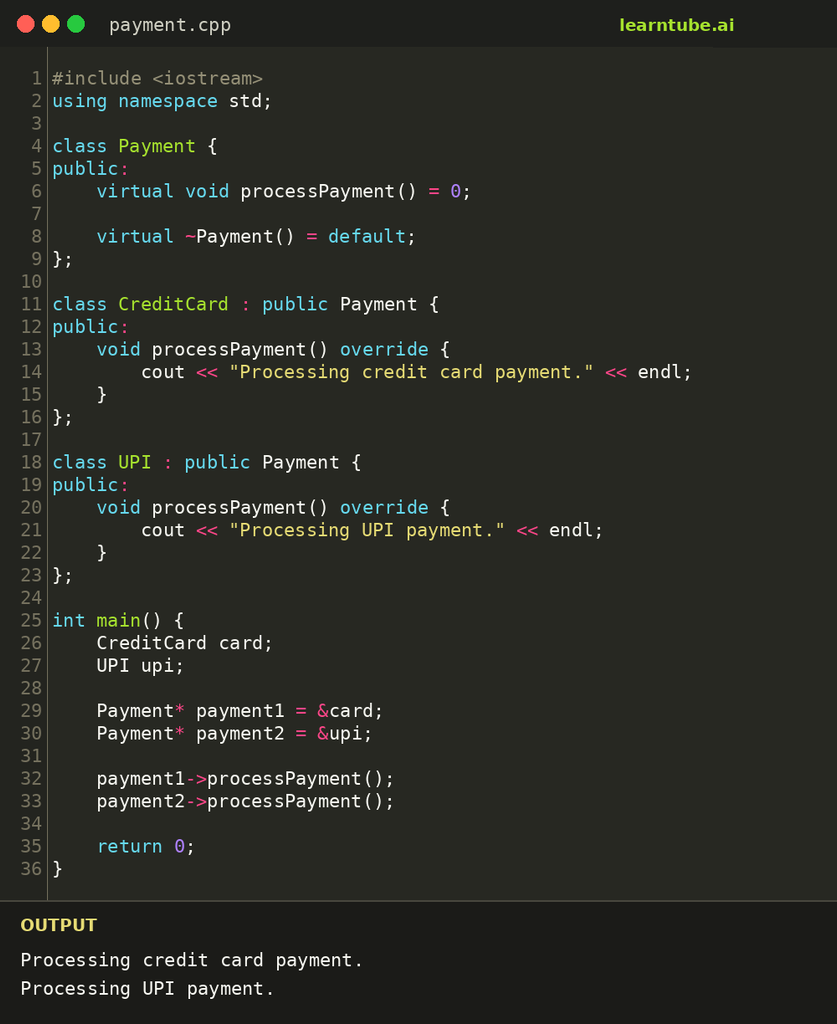
Here:
- Payment is an abstract class that defines the common processPayment() function.
- CreditCard and UPI provide their own implementations.
- The main function calls the same function through a Payment pointer without needing to know the specific payment-processing steps.
- virtual ~Payment() = default; gives the base class a virtual destructor, so an object deleted through a Payment pointer is cleaned up correctly.
This demonstrates how abstraction provides a common interface while allowing different implementations behind it.
What Is Data Abstraction in C++?
Data abstraction in C++ means showing users only the essential information about data while hiding its storage and processing details. Developers usually achieve this in two ways:
- Using classes: private data members hide the internal state, while public member functions expose only the operations users need. The BankAccount class above works this way.
- Using header files and libraries: when you call std::sort() from <algorithm> or pow() from <cmath>, you use the function without knowing which algorithm it runs internally.
Some textbooks also separate data abstraction, which hides how data is represented, from control abstraction, which hides how a sequence of operations is carried out.
What Is the Difference Between Encapsulation and Abstraction in C++?
Encapsulation and abstraction both help manage complexity in C++, but they focus on different aspects of a program. Encapsulation decides how an object’s data is stored and who can change it, using classes and access specifiers. Abstraction decides what the rest of the program needs to see, using public interfaces and abstract classes.
| Basis | Encapsulation | Abstraction |
| Meaning | Combines data and related functions within a class. | Hides implementation details and exposes essential functionality. |
| Main purpose | Controls access to an object’s internal data. | Simplifies how users interact with an object. |
| Focus | How data and behaviour are organised and protected. | What functionality is exposed to the user. |
| Common implementation | Classes and access specifiers. | Abstract classes, pure virtual functions and public interfaces. |
| Example | Keeping a bank account balance private and allowing deposits through a function. | Providing a common payment function without exposing how each payment is processed. |
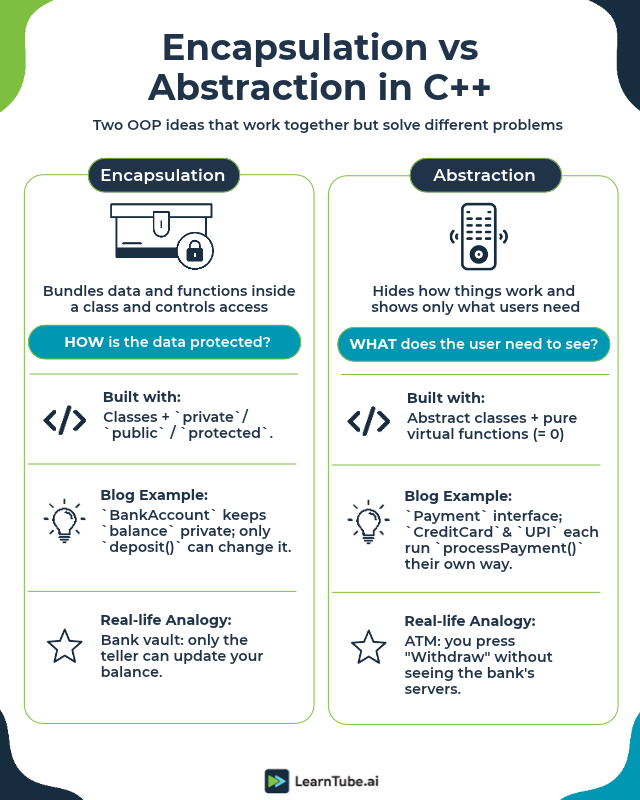
In simple terms, encapsulation controls access to an object’s internal data, while abstraction controls which details a user needs to understand.
The two concepts often work together. A class can use encapsulation to manage its internal state and abstraction to provide a simple interface to the rest of the application.
What Are the Four Pillars of Object-Oriented Programming?
Encapsulation and abstraction are two of the four fundamental principles of object-oriented programming. The other two are inheritance and polymorphism.
Together, these principles help developers build applications using reusable and organised code.
- Encapsulation: Groups data and related functions within a class and controls access to its internal state.
- Abstraction: Hides implementation details and exposes essential functionality.
- Inheritance: Allows a class to acquire properties and behaviour from another class, supporting code reuse.
- Polymorphism: Allows the same interface or function call to produce different behaviour depending on the object or context.
For example, a payment application can use encapsulation to manage transaction data, abstraction to define a common payment interface, inheritance to create different payment classes and polymorphism to process different payment methods through the same interface.
To understand how these concepts work together, explore LearnTube’s lesson on Polymorphism, Abstraction and Encapsulation.
Where Are Encapsulation and Abstraction Used in Real-World Applications?
Encapsulation and abstraction in C++ are used across software development wherever applications need to manage complex operations and provide clear interfaces.
Some common examples include:
1. Banking and financial applications
Encapsulation helps manage sensitive application data, such as account balances and transaction records, by controlling how they are accessed and updated. Abstraction allows users to perform operations such as deposits and transfers without interacting with the underlying processing logic.
2. Payment gateways
Payment applications can use abstraction to provide a common interface for different payment methods. Encapsulation helps keep transaction details and internal processing logic within the relevant classes.
3. Gaming applications
Game objects such as players, characters and weapons can use encapsulation to manage their properties and actions. Abstraction can simplify how different game objects interact with the game engine.
4. Healthcare software
Healthcare applications manage different types of records, appointments and patient-related operations. Encapsulation helps organise and control access to application data, while abstraction simplifies interactions between different parts of the software.
5. Operating systems and device software
C++ is used in areas such as system software and embedded development. Encapsulation and abstraction help organise hardware-related operations and provide interfaces that other parts of a program can use without dealing with every low-level detail.
These concepts do not automatically make software secure or error-free. They provide a structure that helps developers manage complexity, maintain clear responsibilities and reduce unintended access to internal data.
Are Encapsulation and Abstraction Still Relevant in the Age of AI?
Yes. Encapsulation and abstraction in C++ remain important in 2026 because modern software still needs clear structures, manageable components and well-defined interfaces.
AI tools can generate code, explain programming concepts and help developers identify errors. However, developers still need to understand how their applications are structured and how different components interact.
These concepts are particularly useful when building applications that integrate AI services.
For example, an application may connect to multiple AI model providers. Instead of writing the entire application around one provider’s API, developers can create a common interface for tasks such as generating responses or processing inputs.
This is where abstraction becomes useful. The rest of the application can work with the common interface without depending on the implementation details of a particular provider.
Encapsulation can help keep provider-specific configuration, application state and related operations within dedicated classes or components.
Together, these principles can make it easier to update integrations, replace services and maintain application code as requirements change.
AI coding assistants can also help developers practise these concepts. However, generated code still needs to be reviewed, compiled and tested. Understanding why a class uses a private member or a virtual function is important even when an AI tool suggests the code.
Which Tools Can Help You Learn and Practise C++ in 2026?
You can use a combination of coding environments, compilers and AI assistants to understand and practise encapsulation and abstraction in C++.
| Tool | How it helps |
| Visual Studio Code | Provides C++ editing features, IntelliSense and debugging support through its C/C++ extension. |
| GCC and Clang | Compile C++ programs and help you test whether your code works as expected. |
| Compiler Explorer | Lets you examine how different C++ compilers translate your code into assembly. |
| ChatGPT | Can explain concepts, walk through code examples and help you understand compiler errors. |
| Google Gemini and Claude | Can help explain programming concepts, compare implementations and review code. |
| GitHub Copilot | Provides AI-powered code suggestions and coding assistance within supported development environments. |
For beginners, Visual Studio Code with a suitable C++ compiler is a practical starting point. The VS Code C/C++ extension provides features such as code completion, syntax highlighting and error checking, but you need to install a compiler separately.
AI assistants can be useful when you are learning. For example, you can ask one to:
- Explain why a class member should be private.
- Convert a simple procedural program into an encapsulated class.
- Show how an abstract class works with a real-world example.
- Identify errors in a C++ program.
- Compare two implementations and explain their differences.
Treat AI-generated code as a starting point. Run it through a compiler, test different inputs and make sure you understand the output before using it in a project.
How Can You Learn Encapsulation and Abstraction in C++?
The easiest way to understand encapsulation and abstraction is to learn the basics of C++ and then practise these concepts through small programs.
A useful learning path is:
- Understand C++ fundamentals: Start with variables, data types, operators, functions and control structures.
- Learn classes and objects: Understand how classes define properties and behaviour, and how objects are created from them.
- Practise encapsulation: Create classes with private data members and public functions that control how the data is accessed or updated.
- Learn abstraction: Work with abstract classes, pure virtual functions and derived classes.
- Build small projects: Try creating a bank account system, a payment application or a simple library management program.
- Use AI tools to review your code: Ask for explanations and suggestions, then verify them by compiling and testing your programs.
If you want to learn through structured lessons, you can explore LearnTube’s C++ Programming Course in English. The course is also available in Hindi, Telugu and Tamil.
Practising with small programs and gradually building more complex projects will help you understand when and why to use encapsulation and abstraction.
Encapsulation and abstraction in C++ solve two different problems. Encapsulation keeps an object’s data inside a class and controls who can change it. Abstraction decides what the rest of the program needs to see, through public functions and abstract classes. You saw both at work in this guide: a BankAccount class that protects its balance, and a Payment interface that handles cards and UPI the same way.
The quickest way to make these ideas stick is to write small programs and compile them yourself. Start with a class that has private data, then add an abstract base class with two derived classes. When you are ready for structured practice, the C++ Programming Course on LearnTube walks you through classes, inheritance, polymorphism and abstraction step by step.