


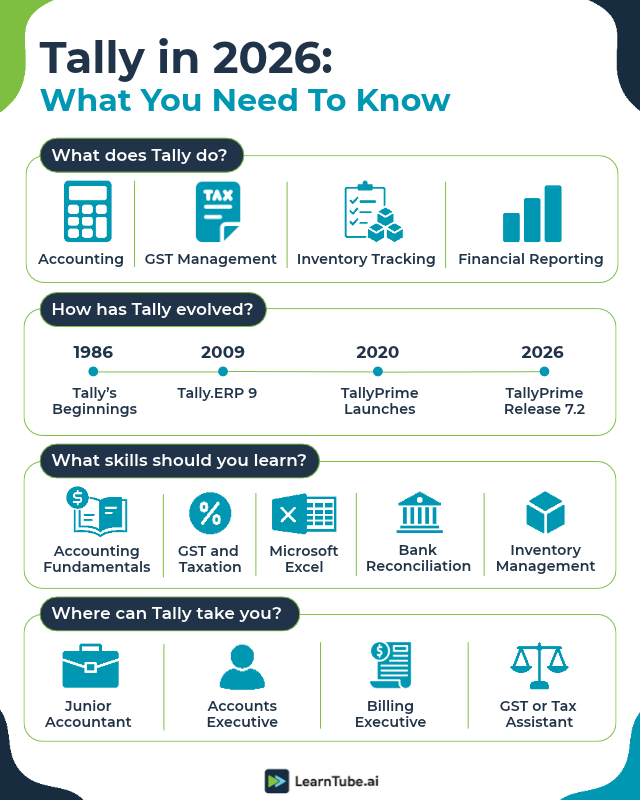
This introduction to Tally explains what the software does, how it has changed and which skills to learn alongside it. Tally helps businesses record transactions, manage accounts, track inventory and handle tax-related tasks. Accountants, small businesses and finance teams use it to organise financial records and prepare reports.
The software has also evolved over the years. TallyPrime now includes features for GST compliance, reporting, banking and selected AI-assisted tasks.
If you want to learn Tally for work, start by understanding its core features, how businesses use them and which additional skills employers expect from accounting professionals. If you prefer a guided route, LearnTube’s Tally course takes you through these step by step.
What is Tally in accounting?
In accounting, Tally is software that keeps a business’s books digitally. Tally is business management and accounting software developed by Tally Solutions. Businesses use it to record financial transactions, manage purchases and sales, track stock, handle payroll and generate reports.
TallyPrime is the current product for everyday accounting and business management. It brings several functions into one system, helping businesses maintain records and review their financial position.
Here are some of its main uses:
| Feature | What you can do with it |
| Accounting | Record transactions, manage ledgers and track income and expenses. |
| Billing and invoicing | Create sales invoices, purchase records and other business documents. |
| GST management | Record GST transactions and prepare relevant reports for tax compliance. |
| Inventory management | Track stock, stock movements and inventory-related transactions. |
| Banking | Record banking transactions and support reconciliation workflows. |
| Payroll | Maintain employee payroll records and process salary-related entries. |
| Financial reporting | Generate reports to review cash flow, outstanding amounts and business performance. |
| Security and access | Configure access controls to help protect company data. |
The features available to a business can depend on its configuration, licence and version of TallyPrime. The examples in this introduction to Tally refer to TallyPrime.
How has Tally evolved over the years?
Tally has changed from an accounting-focused product into a broader business management tool. It began in 1986 as Peutronics Financial Accountant, became Tally.ERP 9 in 2009 and TallyPrime in 2020. The latest release, TallyPrime 7.2, arrived on October 12, 2026. Here are some key milestones from its history, based on Tally Solutions’ company timeline.
| Year | Milestone |
| 1986 | The company behind Tally was founded. |
| 1988 | Tally 3.0 introduced a code-less accounting approach. |
| 1999 | Tally 6.3 added capabilities including multi-currency support and inventory management. |
| 2005 | Tally 7.2 introduced VAT-related capabilities. |
| 2009 | Tally.ERP 9 expanded the product’s enterprise resource planning features. |
| 2017 | Tally introduced GST-compliant software following India’s GST rollout. |
| 2020 | TallyPrime launched with a redesigned interface and navigation. |
| 2026 | TallyPrime Release 7.2 added GSTR-9 data export, 30-day e-Invoice and e-Way Bill sessions and purchase order print templates. |
This timeline shows how the software has developed alongside changing business and compliance needs. The exact features available today depend on the TallyPrime release a business uses.
What is the difference between Tally.ERP 9 and TallyPrime?
Tally.ERP 9 is an older version of Tally’s business software. TallyPrime is the newer product, launched in 2020, with redesigned navigation and continued product updates.
| Area | Tally.ERP 9 | TallyPrime |
| Product status | Legacy product | Current product |
| Interface | Older interface and navigation | Redesigned interface with features such as Go To navigation |
| Updates | No longer under active development | Receives ongoing product updates |
| Learning focus | Relevant when a workplace still uses the legacy version | The recommended starting point for learners preparing to use the current product |
Tally’s official licensing documentation confirms that new Tally.ERP 9 licences have been discontinued and that TallyPrime is the current product.
If you’re using this introduction to Tally to prepare for a new role, focus on TallyPrime unless an employer specifically asks for experience with Tally.ERP 9.
What are the latest features in TallyPrime in 2026?
TallyPrime continues to receive updates for accounting, tax compliance and business workflows. The latest release covered in Tally’s official documentation is TallyPrime Release 7.2, released on October 12, 2026.
Here are some of its updates.
1. GSTR-9 data export
TallyPrime 7.2 includes options to export relevant data from the Annual Computation report to support GSTR-9 preparation and reconciliation. This can help accounting teams organise information for annual GST return work.
2. Longer e-Invoice and e-Way Bill sessions
The release supports extended login sessions of up to 30 days for relevant e-Invoice and e-Way Bill workflows, up from the earlier 6-hour session. This reduces the need to sign in repeatedly during supported tasks.
3. Updated TDS and TCS return support
Release 7.2 includes support for updates to the Protean FVU tool, including specified return forms and validation changes. These updates help users work with supported tax deduction and collection return processes.
4. Purchase order print templates
The release extends print-template functionality to purchase orders. This helps businesses maintain more consistent documentation.
Earlier releases introduced other features, including scheduled backups, connected banking improvements and AI-assisted invoice processing through Docs by Ira.
For the complete list of changes, see Tally’s official TallyPrime 7.2 release notes.
Is Tally still useful for accounting jobs in 2026?
Yes. Tally remains a useful skill for roles that involve bookkeeping, billing, inventory records, GST-related work and financial reporting.
However, employers often look for a combination of software knowledge and practical accounting skills. Knowing where to enter a transaction is only one part of the job. You also need to understand what the transaction represents and how it affects the books.
For example, an accountant might use TallyPrime to record a purchase, check the GST details, update inventory, reconcile a bank statement and prepare a report for a manager.
The software supports these tasks, while the accountant checks the information and makes sure the records are accurate.
Which jobs can you apply for after learning Tally?
Tally can be relevant to several entry-level and experienced roles, depending on your accounting knowledge and work experience.
| Job role | Common responsibilities |
| Junior Accountant | Record transactions, maintain ledgers and assist with bookkeeping. |
| Accounts Executive | Manage accounting records, invoices, reconciliations and reports. |
| Billing Executive | Prepare invoices and maintain sales and purchase records. |
| GST or Tax Assistant | Support GST documentation, tax calculations and return preparation. |
| Inventory Accountant | Track stock-related transactions and reconcile inventory records. |
| Payroll Executive | Maintain payroll information and record salary-related transactions. |
| Audit Assistant | Organise financial records and help prepare documents for audits. |
These roles have different requirements. Some focus on routine data entry, while others require experience with GST, taxation, reconciliation, reporting or payroll.
How much can you earn after learning Tally?
Your salary depends on your experience, location, employer and responsibilities.
| Experience level | Estimated annual salary |
| 0–2 years | ₹1.5–3 lakh |
| 2–5 years | ₹3–5 lakh |
| Over 5 years | ₹5–10 lakh |
| 10+ years | ₹10 lakh and above |
For more details, including salary estimates for different accounting roles and cities, read the full Tally salary guide.
Which skills should you learn alongside Tally?
An introduction to Tally is only the first step. Tally becomes more useful when you can apply it to everyday accounting tasks. Build your knowledge in these areas as you practise with the software.
1. Basic accounting
Understand debits and credits, journal entries, ledgers, trial balances, profit and loss statements and balance sheets. These concepts help you recognise which entries to record and how to check your work.
2. GST and taxation
Learn how GST applies to sales and purchases, how to record tax-related transactions and how to review GST reports. Depending on the role, you may also need to understand TDS and other tax-related processes.
If you want guided practice, explore LearnTube’s Goods and Services Tax (GST) course.
3. Inventory management
Businesses that sell or manufacture products need to track stock, purchases, sales and stock movements. Practise creating stock items, recording inventory transactions and reviewing stock reports.
LearnTube’s Managing Inventory microskill can help you focus on this area.
4. Excel
Excel remains useful for organising data, comparing records, checking calculations and preparing reports. Learn formulas, sorting and filtering, lookup functions and pivot tables as you build your accounting skills.
5. Bank reconciliation and financial reporting
Practise comparing entries in your books with bank statements, identifying differences and correcting errors. You should also learn to read reports and explain what they tell you about a business.
6. Advanced Tally features
Once you’re comfortable with the basics, explore more advanced features that relate to your target role. LearnTube’s Advanced Tally Features microskill offers a focused learning path.
How is AI changing the work of Tally accountants?
AI is beginning to support some routine accounting tasks, including invoice data extraction and transaction preparation. This means accounting professionals may need to understand both their accounting software and the tools that help automate parts of their workflow.
One example is Docs by Ira, Tally’s AI-assisted invoice-processing solution. It can extract information from invoices and prepare draft entries in TallyPrime. Users can review those drafts and make corrections before saving the transactions.
Tally describes this as a way to reduce manual data entry. The amount of time saved will depend on the documents, workflow and quality of the extracted information.
Read more in Tally’s official explanation of Docs by Ira.
AI adoption is also relevant to the wider finance profession. ACCA’s Global Talent Trends 2026: India report found that 57% of surveyed finance professionals in India were already using AI in their current role. The survey covers finance professionals broadly, so this figure should not be interpreted as a statistic about Tally users specifically.
For someone moving on from an introduction to Tally, the practical takeaway is to build a combination of skills:
- Use TallyPrime to record and manage transactions.
- Understand accounting principles and tax requirements.
- Use Excel to check and analyse data.
- Learn how reconciliation and reporting work.
- Get comfortable reviewing AI-generated entries and correcting mistakes.
Automation can reduce repetitive work, but accounting knowledge remains essential for checking records and making sound decisions.
How can you start learning Tally?
You can learn Tally from home with a computer, practice exercises and a structured learning plan. Start with the fundamentals, then work through realistic accounting scenarios. Tally Solutions lets you install TallyPrime in Educational Mode without buying a licence, so you can practise for free. The main limit is that you can enter transactions only on selected dates.
Step 1: Learn the basics of accounting
Understand ledgers, vouchers, debit and credit entries, and financial statements before moving on to complex tasks.
Step 2: Get familiar with TallyPrime
Learn how to create a company, configure basic settings, create ledgers and enter transactions. Practise with sample data rather than relying only on demonstrations.
Step 3: Practise common transactions
Work through examples such as recording sales, purchases, receipts, payments and journal entries. Review the resulting reports to understand how each entry affects the accounts.
Step 4: Add GST and inventory
Practise recording transactions with GST and managing stock. Learn how to check reports and identify inconsistencies.
Step 5: Work through a complete accounting scenario
Create a sample business and record a series of transactions from start to finish. Include sales, purchases, expenses, bank entries and inventory movements. Then review the ledgers and financial reports.
Step 6: Build a broader skill set
Add Excel, reconciliation, reporting and the tax-related skills required for your target role. Keep a record of the tasks you can complete independently so you can explain your practical experience during interviews.
To go beyond this introduction to Tally with a guided course, start with LearnTube’s Tally course. You can also choose the Tally course in Hindi or Tally in Hindi by Rahul Chaudhary
Introduction to Tally: FAQs
Conclusion
This introduction to Tally shows that the software is a practical starting point for people interested in accounting, bookkeeping, billing and finance operations. Learning the software can help you understand how businesses record transactions, manage inventory and prepare financial reports.
To prepare for work after this introduction to Tally, pair TallyPrime practice with accounting fundamentals, GST, Excel and reconciliation. As you gain confidence, move on to more advanced tasks and learn how to review automated entries carefully.
The goal is to be able to complete accounting tasks accurately and explain the work behind the numbers. To practise with guided lessons, start with LearnTube’s Tally course.


We are a bunch of volunteers and opening a new scheme in our community.
Your website offered us with helpful info to work on. You’ve done
a formidable task and our entire group can be thankful to you.
Thank you so much for your kind words! I’m thrilled to hear that the information has been helpful for your community project. Best of luck with your new initiative, and I’m glad I could contribute in some way. Your group’s efforts sound amazing
Thank you so much for your kind words! I’m really glad the information has been helpful for your community project. It’s wonderful to hear about the work you’re doing, and I’m honored to have contributed in some way. Wishing you all the best in your new initiative!
Thanks for the marvelous posting! I certainly enjoyed reading it, you can be a great author.
I will be sure to bookmark your blog and will eventually come back at
some point. I want to encourage you to definitely
continue your great posts, have a nice holiday
weekend!
Thank you so much for your kind words and encouragement! It truly means a lot. Wishing you a wonderful holiday weekend as well!